4.17 How to configure Export Logs
Scribbler Log Manager supports On-Demand and Scheduled Exports.
Procedure
-
In the navigation pane, navigate to Configuration > Export Logs > Export Logs tab.
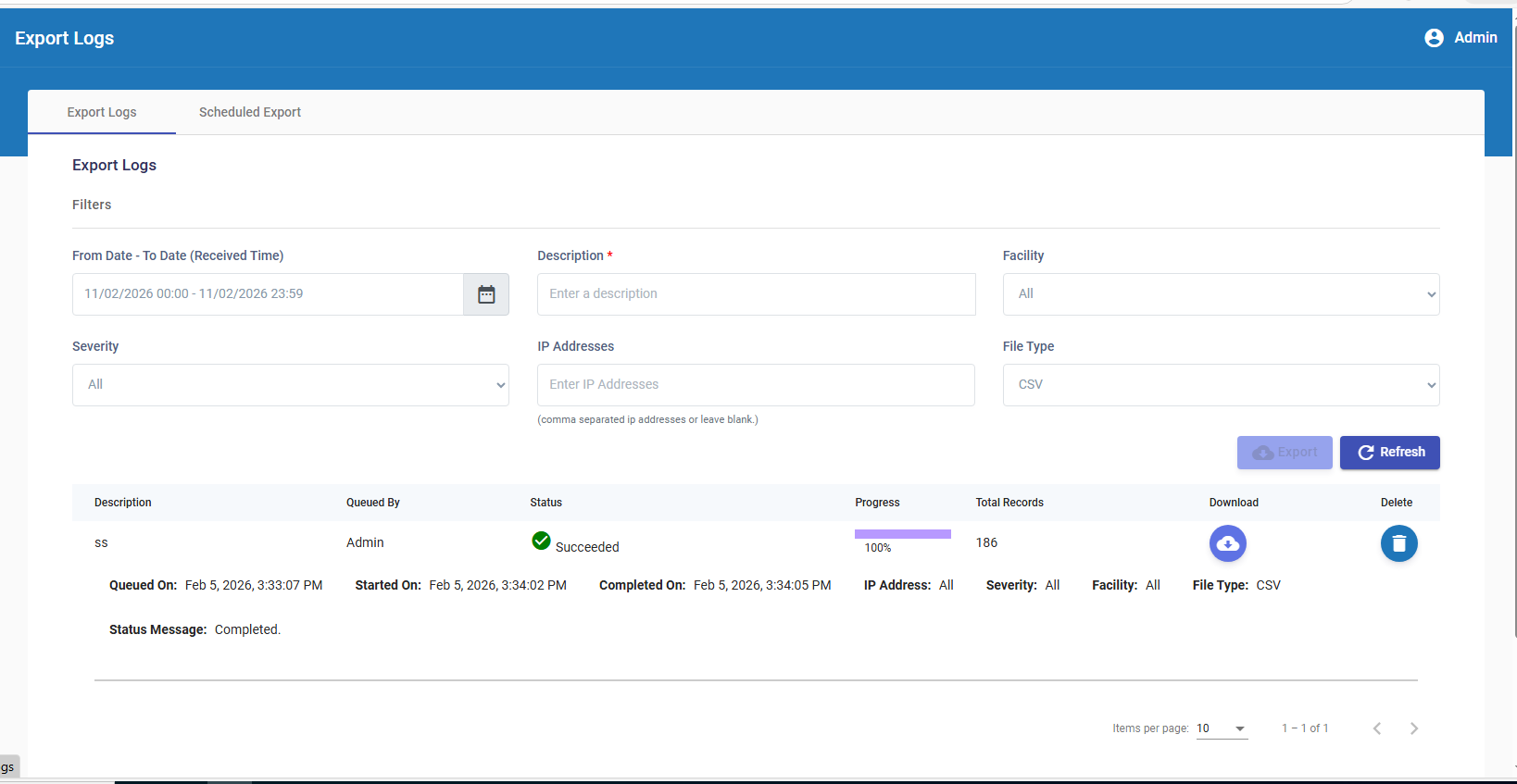
-
Specify filter criteria for exporting logs:
- From Date – To Date (Received Time) -> Logs received within the selected date range will be exported.
- Description -> Entered description will be reflected in the export summary table.
- Facility -> Logs received from the selected facility will be exported.
- Severity -> Logs received from the selected severity will be exported.
- IP Addresses -> More than one IP can be given. Logs from the given IP address / IP addresses will be exported.
- File Type -> Export logs in the selected file format. Two formats available 1.CSV 2.XML
- Select Export.
-
Based on the selected filter criteria, logs will be exported in the background. Exported files will be listed in the Export Summary table.
-
Export summary table has options to Download and Delete the exported file.
📄️ 4.17.1 Scheduled Export
Scribbler supports scheduled export of logs.