4.5 How to configure Active Directory Authentication
The solution supports integration with Microsoft Active Directory through LDAP. The authentication is “pass-through”, which indicates that the credentials are not stored.
Upon successful login with the AD, Scribbler will check whether the user is part of ScribblerAdmin or ScribblerUser groups (configurable) and provide access based on their role.
If the login fails due to any reason (wrong password, insufficient permission, server down), the credentials are validated against local accounts and the user will be allowed to login upon successful verification.
Procedure
-
In the navigation pane, navigate to Configuration > Active Directory.
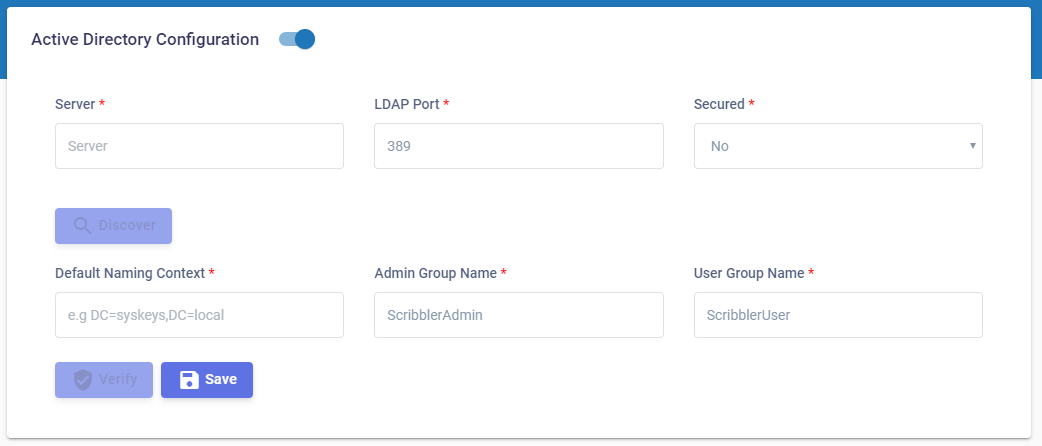
-
Enable the active directory option.
-
Provide the Active Directory server IP address or FQDN (Fully Qualified Domain Name).
-
Provide the port number for the LDAP connection on the AD Server.
a. Typically, 389 for non-TLS connections.
b. Typically, 636 for TLS connections. TLS requires a proper certificate infrastructure. -
Click Discover. The system will try to find the LDAP naming context.
-
Once obtained, the naming context will be automatically shown on the “Default Naming Context”
-
Provide a group name for Admin and User roles in “Admin Group Name” and “User Group Name”
-
Login to the Active Directory server and create the groups with the name you entered in Step 6. And assign the users to the group.
-
Click the verify button and try to validate the configuration. An error message is displayed in case incorrect inputs are provided. Please troubleshoot the issue based on the message or contact support.
-
Once verified, click
 .
. -
Active directory will be enabled from next login.