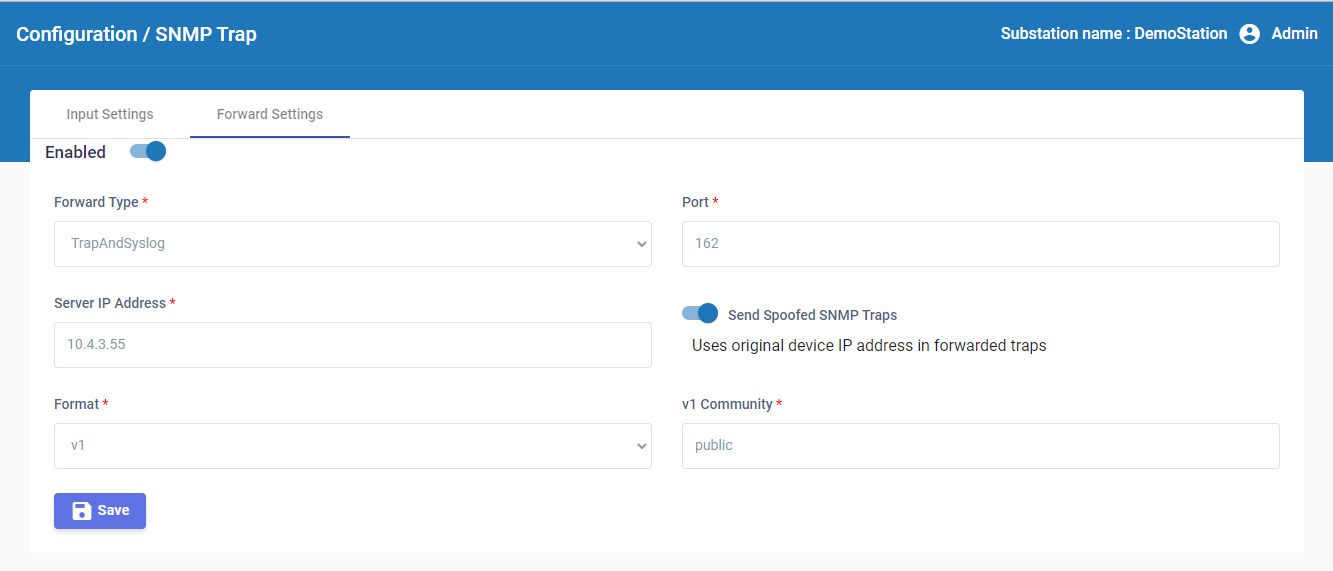
4.4 How to configure SNMP traps forward settings
You must configure Scribbler to forward the SNMP traps to a remote server.
Procedure
-
In the navigation pane, navigate to Configuration > SNMP Trap.
-
In the Forward Settings tab, enable Scribbler to forward SNMP traps.
-
Select the Forward Type as Trap, Syslog, or Trap and Syslog.
-
Specify the port number and the IP address of the remote server.
-
To forward the SNMP traps with original source address in the IP header, enable Send Spoofed SNMP Traps.
-
Select the format of the forwarded messages as either v1 or v2c.
-
Specify the community string that must be included with the SNMP traps.
-
Click
 .
.