4.3 How to configure SNMP trap input settings
You can configure Scribbler to receive SNMP traps from network devices and then forward the information to Logstash.
Procedure
-
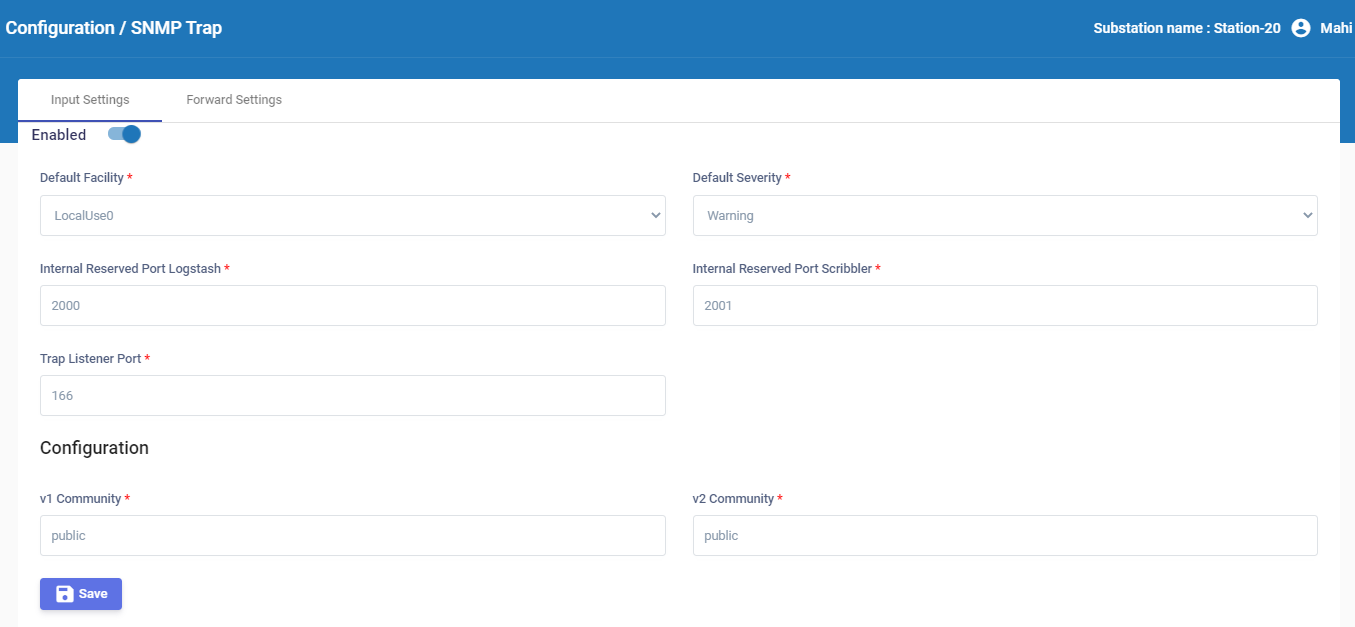
In the navigation pane, navigate to Configuration > SNMP Trap.
-
In the Input Settings tab, enable Scribbler to receive SNMP traps.
-
Set the default facility and default severity levels for the traps.
-
Specify the port reserved on Logstash to receive the traps.
-
Specify the port reserved on Scribbler to receive the traps.
-
Specify the port that must be monitored for SNMP traps.
-
Specify the community string that must be included for SNMPv1 and SNMPv2 protocols. The default value is “public”.
-
Click
 .
.