4.10 How to configure SNMP
Scribbler supports SNMPv3 for reporting purposes.
Procedure
-
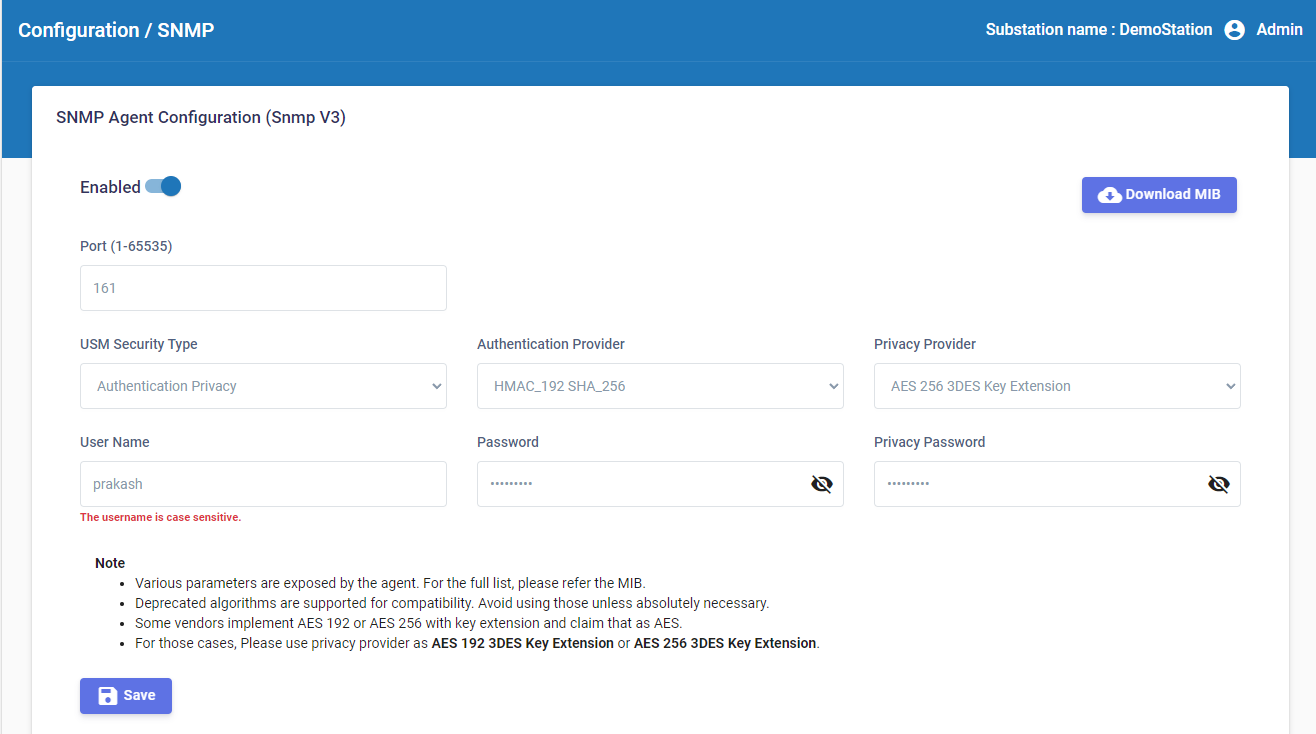
In the navigation pane, navigate to Configuration > SNMP Agent.
-
Enable SNMP Agent.
-
Enter the agent Port number.
-
Select the USM Security Type. The options are: No Authentication No Privacy, Authentication No Privacy, and Authentication Privacy.
-
If the security type includes authentication, select the Authentication Provider and enter the user credentials.
-
If the security type includes privacy, select the Privacy Provider and enter the privacy password.
-
Click

-
To view the full list of parameters exposed by the agent, download the MIB file. Click

Note: Deprecated algorithms such as MD5, SHA, and DES are supported for compatibility. It is recommended that the deprecated algorithms are not used unless absolutely necessary. If you are using AES 192 or AES 256 with key extension, use privacy provider as AES 192 3DES Key Extension or AES 256 3DES Key Extension respectively.