11. Log Search Recommendation
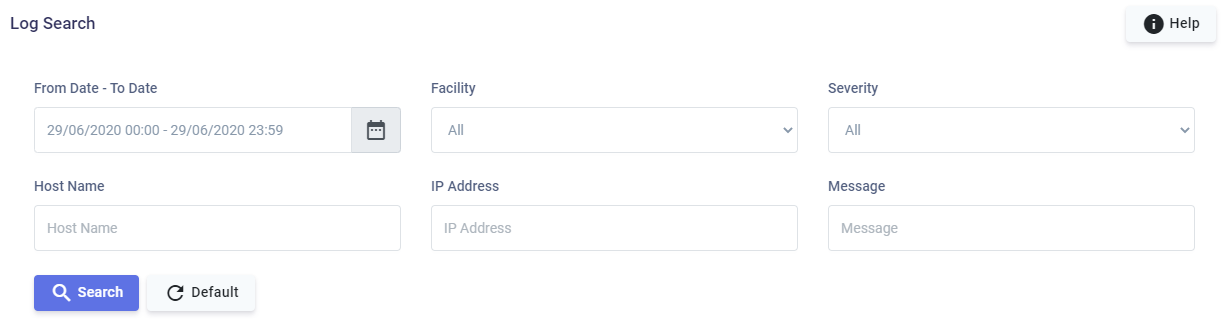
| Sl.No | Field | Description |
|---|---|---|
| 1 | From & To Date | Option to select a date range. |
| 2 | Facility & Priority | Option to select from predefined list of Facility & Severity. |
| 3 | Host | The host name. The search is always a "Starts With" search. For example, a search term of abc will look for all hostnames starting with abc. |
| 4 | IP Address | The search term for the IP Address. The search is always a "Starts With" search. For example, a search term of 170 will look for all IP addresses starting with 170. |
| 5 | Message | The search term for the message. Operators: • + signifies AND operation • | signifies OR operation • - negates a single token • " " wraps multiple tokens to signify a phrase search • * at the end of a term signifies a prefix query By default, the words in the search term are combined as OR, and the search looks for exact words. Examples (try without the surrounding single quotes): 1. 'login admin user' transforms to 'login OR admin OR user' — searches for logs containing any of these words. 2. 'login +admin +user' transforms to 'login AND admin AND user' — searches for logs containing all of these words. 3. 'login -admin' transforms to 'login OR (NOT admin)' — searches for logs containing 'login' or not containing 'admin'. 4. 'login +-admin' transforms to 'login AND (NOT admin)' — searches for logs containing 'login' but not 'admin'. 5. '"john-doe"' — searches for logs that match exact or in-sequence terms. Special characters are usually ignored; for example, the search matches logs such as 'billi john doe', 'misc john-doe data3', and 'security misc john-doe data3', but not 'security audit by john d doe'. 6. '(login +admin) | (user)' transforms to '(login AND admin) OR user'. 7. 'Sys' — searches for logs containing the exact word 'Sys'. 8. 'Sys*' — searches for logs containing any word that starts with 'Sys'. Note: '*' can only be used at the end of a term; '*Sys' does NOT work. |
| 6 | Help | Click Help for more information about the search operators and examples to narrow the scope of your search. |