4.16 How to configure Kafka Forwarding
Scribbler supports forwarding logs to Kafka.
Procedure
-
In the navigation pane, navigate to Configuration > Kafka Forwarding
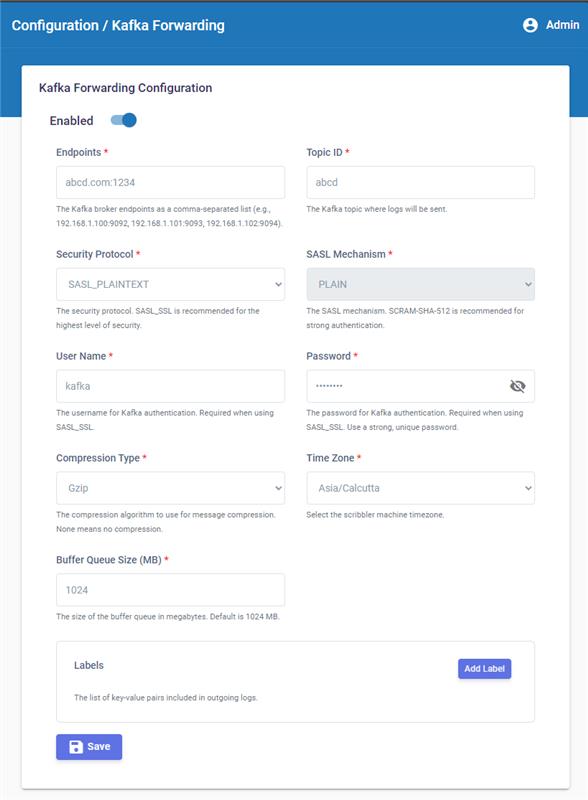
-
Enable Kafka Forwarding
-
Configure the mandatory parameters with required values
-
Endpoints -> Endpoint specifies the host and port of the kafka broker. It can be a single node or multiple cluster nodes. Multiple broker endpoints can be given as a comma separated list. The provided endpoints should be active and working.
-
Topic ID -> A topic name is the channel used to store the logs in kafka.
-
Security Protocol -> The security protocol parameter determines the authentication and encryption method for kafka connections. The following protocols are supported - PLAINTTEXT, SSL, SASL_PLAINTEXT, SASL_SSL.
-
SASL Mechanism -> The SASL mechanism specifies the authentication method used for kafka connections. The following values are supported PLAIN, SCRAM-SHA-256, SCRAM-SHA-512
-
User Name -> Enter username
-
Password -> Enter password (user name and password for kafka authentication)
-
Compression Type -> The compression type specifies the algorithm used to compress log messages before sending to kafka. Supported Options are - Gzip, Snappy, Lz4, Zstd
-
Time Zone -> select the time zone for event timestamps
-
Buffer Queue Size -> Specify buffer queue size to temporarily store logs while the broker is inactive
-
Labels (optional) -> Labels are key value pairs used to categorize and identify resources or messages
Note:
When multiple broker endpoints are configured, scribbler attempts to connect the first broker, if the first broker is inactive, it proceeds to try the next. Once connected, based on the advertised listener configuration, appropriate broker is selected, and logs will be sent to that broker. If the broker is down or not available, the logs are buffered until a connection is restored.