4.2 How to forward logs to a remote server
Scribbler can be configured to forward system logs to a remote server.
Procedure
-
In the navigation pane, navigate to Configuration > Syslog Input/Forward.
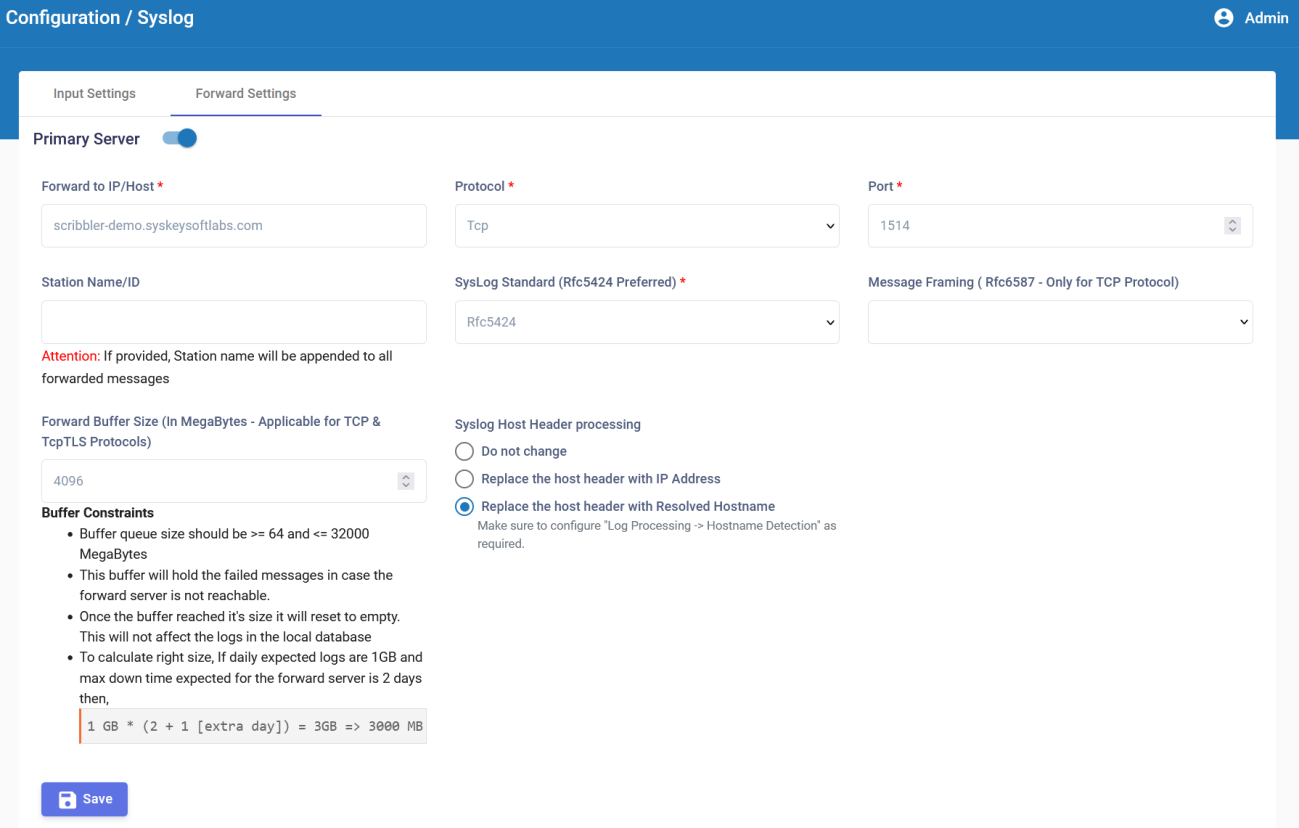
-
In the Forward Settings tab, specify the IP address, network protocol, port number, station ID, and syslog standard of the primary remote server.
-
To securely send logs over encrypted channel, choose TLS as protocol.
-
If the protocol is TCP, select the method for TCP framing. The available options are Octet Counting and Non Transparent Framing.
-
If the protocol is either TCP or TCPTLS, enter the Forward Buffer Size in MB. The minimum value is 64 MB and the maximum value is 32K MB.
Note: The buffer holds the failed messages when the forward server is unreachable. After the buffer reaches the size specified here, the buffer resets to empty. This does not affect the logs in the local database.
-
Syslog Host Header Processing helps handle certain upstream forwarding scenarios.
a. Do not change – Forwards the syslog host value as received from the source device.
b. Replace the host header with IP Address – Replaces the syslog host header value with the original device’s IP address during forwarding.
c. Replace host header with Resolved Hostname – Replaces the syslog host header value with the resolved hostname during forwarding. For more details, refer to How to Configure Hostname Detection. -
Click
 to verify the TLS connection parameters are correctly configured.
 -
Click Save
 .
.
You can refer to the Log Forwarding section for more details about the various configuration parameters available for this option.
You can calculate the correct buffer size depending on the daily expected logs file size and the maximum down time expected. For example, if the daily expected logs are 1GB and the maximum expected down time for the forward server is 2 days, the correct buffer size can be calculated as:
1 GB * (2 + 1 [extra day]) = 3GB => 3000 MB