5.2.1 Collection through RPC (EvtQuery)
Technical Background
EvtQuery RPC uses native windows RPC along with EvtSession to establish remote connections and read the event logs.
Environment & Requirements
- One Windows Server / Client instance –For SyskeyOT Windows Agent installation.
- One Windows Server / Client – Windows Vista or Higher or Windows 2008 or Higher
- GPO – A familiarity with Group Policy Objects will be required.
Step by Step Instructions
Configure Remote Machine (Manually)
- Create a domain or local user (on the remote machine) and add the user to the remote machine's Event Log Readers group.
- Allow the following firewall rules on the remote machines:
- Remote Event Log Management (RPC)
- Remote Event Log Management (RPC-EPMAP)
- By default, the above rules are available only for Private and Domain profiles. Choose the right profile based on your deployment architecture.
Configure Remote Machine (Group Policy)
- Create a domain user named "ScribblerEventReader"
- Create and open the GPO "Scribbler Remote Event Log Collection"
- Goto Computer Configuration -> Preferences -> Control Panel Settings -> Local Users and Groups
- Right click on "Local Users and Groups" and select New -> Local Group
- Choose the following options:
- Action -> Update
- Group Name -> Event Log Readers (Built In)
- Members -> Choose the user ("ScribblerEventReader") which was created earlier.
- Setup Firewall Rules
- Goto Computer Configuration > Policies > Windows Settings > Security Settings > Windows Firewall with Advanced Security.
- Add inbound rule.
- Choose Predefined and select "Remote Event Log Management"
- Select the following rules:
- Remote Event Log Management (RPC)
- Remote Event Log Management (RPC-EPMAP)
- Select the following rules:
- Click Next and Choose "Allow the connection"
- Assign the GPO to required computers.
- Wait for the GPO to propagate to the required computers.
Configure Remote SyskeyOT Windows Agent
-
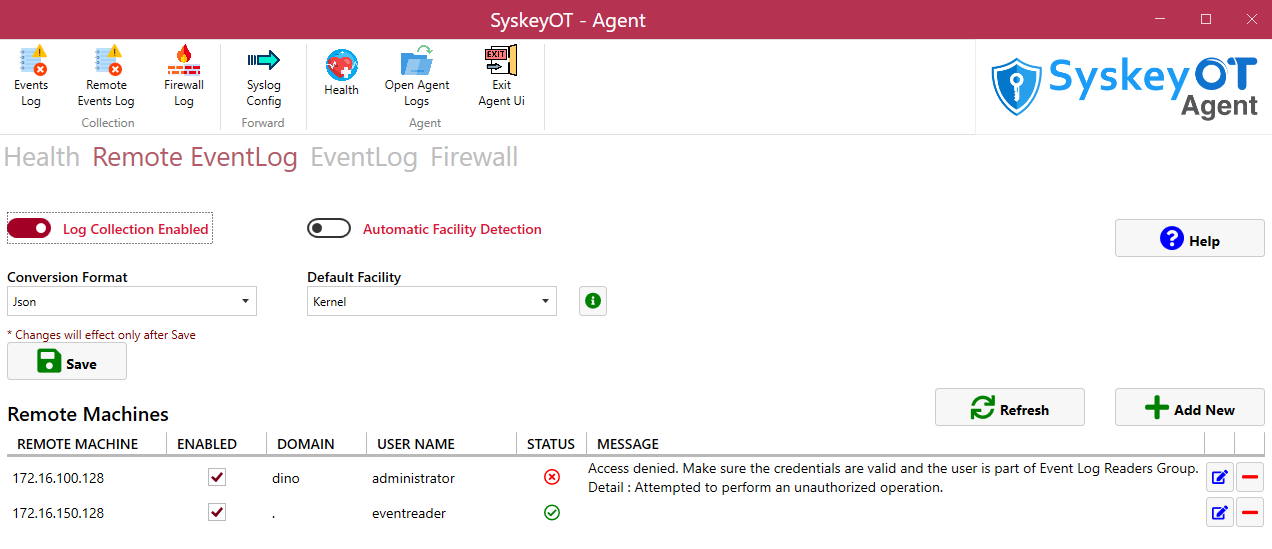
In the top navigation pane, click the Remote Event Log tab.
-
Enable Log Collection – Click on Toggle switch to Enable/Disable Remote Event Log collection of the local machine.
-
Enable Facility Detection – Enable this feature to allow the agent to Auto Detect the Facility of the captured event logs.
-
Default Facility - The default facility to be used when facility detection is not possible.
-
Conversion Format – Configures how the event logs to be converted to. Please click the help button next to it for various options.
-
Click

Configure SyskeyOT Windows Agent
-
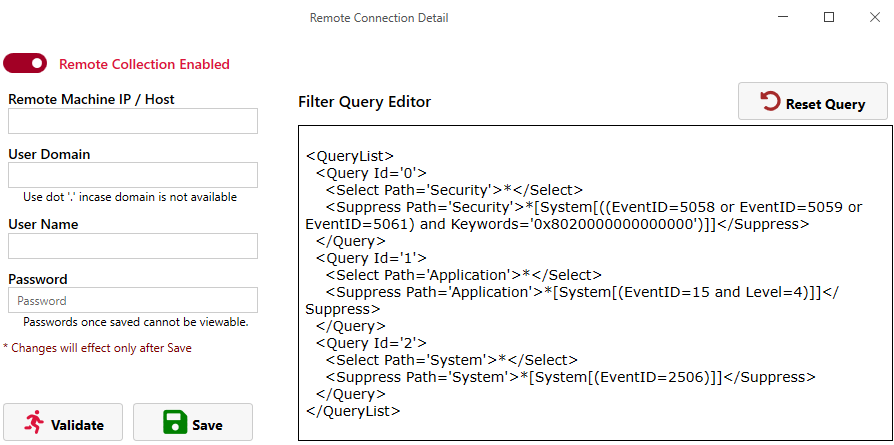
Click the Add New button on the home screen to add a new remote machine.
-
Click the toggle switch at the top left to enable disable this specific "Remote Machine."
-
Provide the remote machine credentials.
-
Click Validate to verify that the configuration is correct.
-
Save the configuration.