5.7 How to forward Windows logs to Syslog Server
Configure SyskeyOT Windows Agent to forward system Windows logs to a syslog server over Syslog protocol in RFC5424 format.
Procedure
-
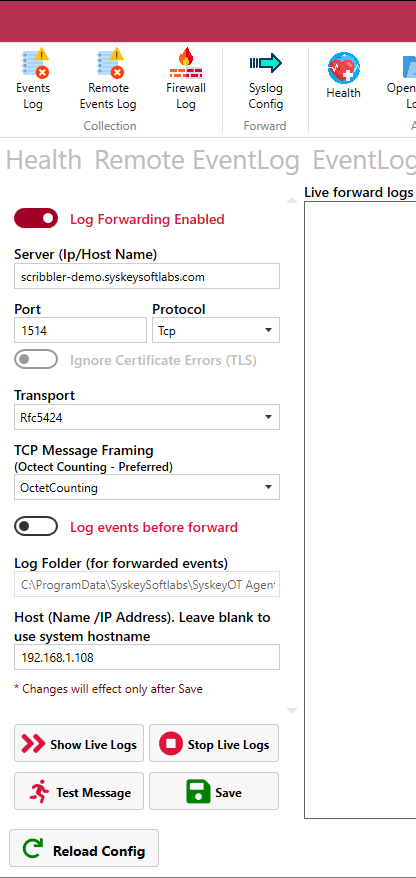
In the top navigation pane, Click on Syslog Config Tab
-
Switch the Toggle switch to Enable Log Forwarding option
-
Specify the IP address, network protocol and port number of the Syslog Server.
-
Select the method for TCP framing. The available options are Octet Counting and Non-Transparent Framing.
-
Switch the toggle switch to Enable Secondary Forwarding option (optional).
a. Specify the IP address and port number of the Secondary Syslog Server.
b. Protocol is restricted to UDP.
c. Note: When secondary forwarding is enabled, both primary and secondary protocols must be UDP. If the primary server is configured with TCP, a warning message will be displayed.
-
Switch the Toggle switch to Enable/Disable local recording of logs in a specified folder.
-
Host – Provide the host name or IP address to be used in the syslog header of the forwarded messages. Leave blank to use the current machine name.
-
Click Test message option to test the sample message from Windows Agent to the syslog Server.
-
Click Show Live Logs to see the real time logs flowing towards the Syslog Server.
-
Click
 .
.