10.2.2 Scribbler Installation
The scribbler application is distributed as a tar file containing application binaries and installation script.
Procedure - (All Linux)
- Ensure the target environment meets the system requirements.
- Get the software package:
- The software package is distributed as a zipped tar file. Please contact the support / sales team for the latest version of the software package.
- Copying Files:
- Copy the App Binary Package:
scribbler_2023-07-14_1.10.13.tar - Copy it to a USB thumb drive and mount it on the Scribbler computer.
- Network Transfer through SCP:
scp <source> <destination>
# Example:
scp ./scribbler_2023-07-14_1.10.13.tar
serviceadmin@<ip_address>:/home/<username>/ - FileZilla software can also be used to transfer files.
- Copy the App Binary Package:
- Uninstall existing Scribbler application if any:
- Login to the SSH console.
- Go to the previous installation's extracted folder. Run the following command:
sudo ./uninstall-scribbler.ps1
- Extract the Scribbler application update package:
tar -xf ./scribbler_2023-07-14_1.10.13.tar --one-top-level- That will create a folder named "scribbler_2023-07-14_1.10.13"
- Install the application:
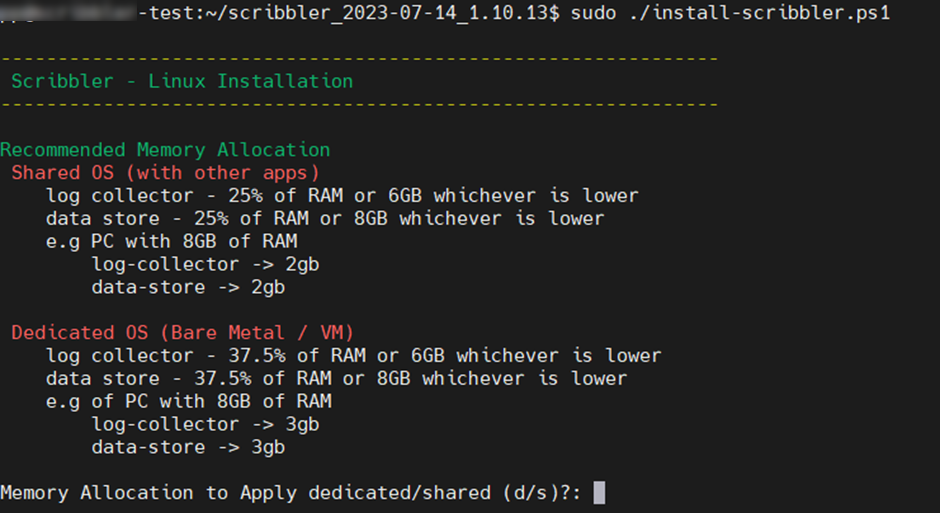
cd scribbler_2023-07-14_1.10.13sudo ./install-scribbler.ps1- The script may require some inputs from the user side
-
Memory Allocation
- Provide
dif the VM / hardware is dedicated to Scribbler Log Manger. - Provide
sif the VM / hardware is shared with other applications. to Scribbler Log Manger.
- Provide
-
Data folder selection

- The location to store the data files (log database, application logs,…). Make sure to have enough space on the drive (at least 20 GB).
-
- That's all.
- It will take few minutes for the Scribbler services to start.
- Once installed, open a web browser and navigate to
https://<IP of the Scribbler machine>to connect to the web interface.